
Tag Page

How to configure Microsoft Outlook 2010 to Send & Receive Mail

If you've just started using Wild Planet as your email service provider, there are a few configuration changes you will need to make in your Microsoft Outlook before you can begin sending and receiving mail. Up to now, your Outlook has been configured to log into your previous email servers, but now you must give it the instructions it needs to log into ours.

There are quite a few versions of Microsoft Outlook, but the settings are the same for all of them. The only thing that is different is how you get to the Account Settings area. Below you will find instructions for Outlook 2010; we are currently working on instructions for Outlook 2000, 2003, 2007, and 2013.


1. Start the Microsoft Outlook program.

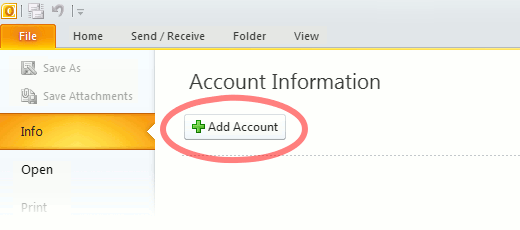
Use the Start menu to start Outlook 2010. If you’ve never used Outlook before, it will prompt you to create a new account. In that case, skip ahead to step 2. If you’ve previously used Outlook and it doesn’t prompt you, click the File tab, then the Add Account button (see image below).

Or, if you have been using Outlook previously and simply need to reconfigure it in order to use our email servers, then look for your existing account in the Account Settings window, and then click the CHANGE button. (because you will be CHANGING existing account settings). Skip to Step 4 below.
outlook2010 1

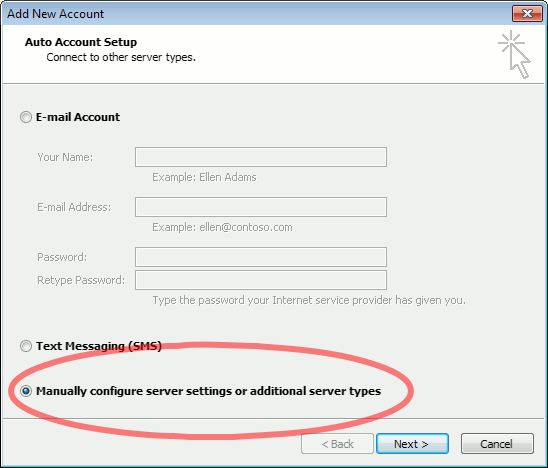
2. The “Auto Account Setup” screen appears.

When this window appears, leave the spaces empty, choose the Manually configure server settings or additional server types option, then click Next.
outlook2010 2

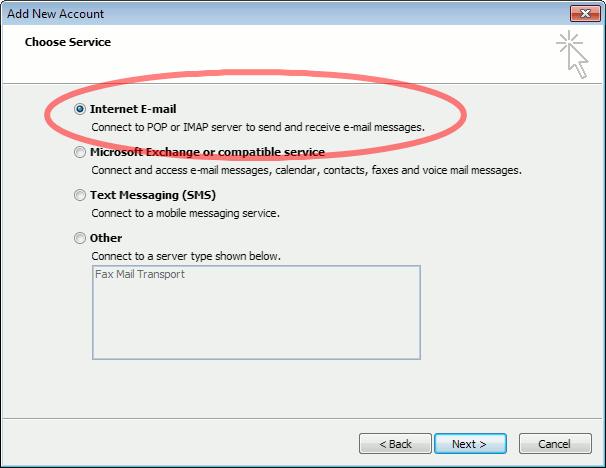
3. The “Choose Service” screen appears.

Choose Internet E-mail, then click Next.
Outlook 2010

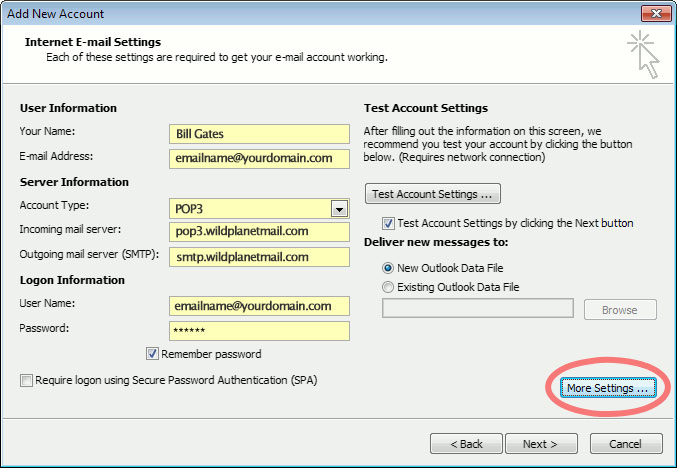
4. The “Internet E-mail Settings” screen appears.

This is the window where you’ll enter most of your account settings. You want the window to look like this:
Outlook 2010
  • “Your Name” is the name that other people will see when you send them e-mail. It should usually be your real name, such as Bill Gates or Joan of Arc.
  • Enter your “E-mail Address”. The address must be the e-mail address of the mailbox you created in your account management control panel.
  • For “Account Type”, choose POP3.
  • Enter pop3.wildplanetmail.com for the “Incoming mail server” and smtp.wildplanetmail.com for the “Outgoing mail server (SMTP)”.
  • Enter your (full) e-mail address again as the “User Name”. (The user name must be all lowercase).
  • Type your e-mail password into the “Password” box. This is the password you chose for this e-mail address when you created the mailbox in your account management control pane (unless we have created it for you). This password may be different from your master “My Account” password with our company.
  • Make sure that “Require logon using Secure Password Authentication (SPA)” is not checked.
  • Do not click “Test Account Settings” or “Next” yet; they will not work until you complete the next steps.

5. View “More Settings”.

Click the More Settings button. A new “Internet E-mail Settings” window appears.

6. Choose the “Outgoing Server” tab.

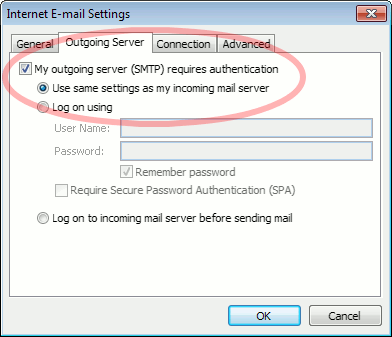
In the “Outgoing Server” tab, check My outgoing server (SMTP) requires authentication and make sure Use same settings as my incoming mail server is selected:
Outlook 2010 outgoing authentication


7. Close the “Internet E-mail Settings” window.

Click OK to close the “Internet E-mail Settings” window. The “Add New Account” screen will still be visible.

8. Test the settings.

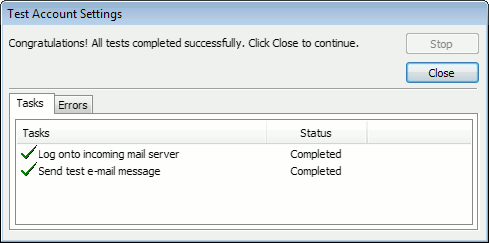
Click Next. Outlook will test the settings, then should tell you that “all tests completed successfully”:
outlook2010 10

If Outlook tells you a test failed, double-check to be sure you’ve entered the settings correctly.

9. Finish the wizard.

If the “Test Account Settings” window is still open, click Close to continue.

Click Finish to finish the wizard.

Outlook setup is complete

You’re finished! Try sending yourself a test e-mail message to make sure it works.

Read 1218347 times Last modified on %AM, %07 %246 %2015 %04:%Mar

About The Author

Super User

Lorem ipsum dolor sit amet, consectetur adipiscing elit, sed do eiusmod tempor incididunt ut labore et dolore magna aliqua. Ut enim ad minim veniam, quis nostrud exercitation ullamco laboris nisi ut aliquip ex ea commodo consequat. Duis aute irure dolor in reprehenderit in voluptate velit esse cillum dolore eu fugiat nulla pariatur.

193261 comments

  • oficialnyy_wspn
    Comment Link oficialnyy_wspn %AM, %19 %050 %2026 %00:%Jan

    Официальный дилер Lixiang приглашает вас ознакомиться с лучшими предложениями на lixiang купить.
    Выбор официального дилера – залог безопасности и качества при покупке Lixiang.

    Основной задачей официального дилера является обеспечение клиентов полной информацией.

  • tehosmotr_mmpa
    Comment Link tehosmotr_mmpa %AM, %19 %049 %2026 %00:%Jan

    Если вы ищете информацию о техосмотр 2026 в Санкт-Петербурге, посетите специализированный сайт для получения актуальных услуг и цен.
    Обязательным является прохождение техосмотра для каждого автовладельца в стране. Он обеспечивает безопасность на дорогах и предотвращает аварии. Отсутствие техосмотра не позволит застраховать автомобиль по ОСАГО.

    В СПб организованы удобные станции для проведения техосмотра в различных районах. Осмотр подразумевает тщательную диагностику основных узлов машины и получение официального документа.

    Прежде всего, автовладелец должен собрать требуемые бумаги, включая личный паспорт и регистрационное удостоверение. Далее необходимо явиться на пункт для детального осмотра, во время которого оцениваются тормоза и прочие компоненты. Итогом становится выдача карты, которая подтверждает, что авто соответствует всем требованиям.

    Процедура охватывает диагностику тормозной системы, осветительных приборов и иных важных частей. Также проверяются шины на износ и соответствие сезонным нормам. Каждый проверяемый узел обязан полностью удовлетворять общим нормам безопасности.

    Жителям Санкт-Петербурга доступны многочисленные официальные станции для прохождения техосмотра. Например, один из центров расположен на Московском проспекте, где можно записаться заранее. Другие варианты есть в Приморском районе, где процесс организован удобно и оперативно.

    Подберите подходящий пункт, основываясь на близости и отзывах других водителей. Проверьте часы работы центра заранее, чтобы спланировать визит без проблем. Запишитесь онлайн или по телефону для удобства и экономии времени.

    Регулярный техосмотр продлевает срок службы автомобиля и повышает его надёжность. Такая процедура уменьшает шансы на инциденты и экономит средства на последующие ремонты. Следуйте рекомендованному расписанию, избегая юридических последствий и гарантируя безопасную езду.

    При просрочке процедуры водитель получит наказание в виде штрафа от дорожной инспекции. Поэтому не игнорируйте сроки и проходите осмотр вовремя. Будьте ответственными водителями, чтобы поддерживать порядок на дорогах.

  • Jeffrey Belew
    Comment Link Jeffrey Belew %AM, %19 %048 %2026 %00:%Jan

    create an experience that feels both educational and inspiring. Every

  • fast auto glass replacement Stokesdale NC
    Comment Link fast auto glass replacement Stokesdale NC %AM, %19 %048 %2026 %00:%Jan

    Absolutely stellar writing — I’m blown away!

  • windshield replacement cost Stokesdale NC
    Comment Link windshield replacement cost Stokesdale NC %AM, %19 %048 %2026 %00:%Jan

    The level of insight in this post is outstanding.

  • back glass replacement Stokesdale NC
    Comment Link back glass replacement Stokesdale NC %AM, %19 %047 %2026 %00:%Jan

    Another excellent post — you never disappoint!

  • auto glass service at work Stokesdale NC
    Comment Link auto glass service at work Stokesdale NC %AM, %19 %047 %2026 %00:%Jan

    The enthusiasm here is off the charts — well done!

  • best auto glass company in Stokesdale NC
    Comment Link best auto glass company in Stokesdale NC %AM, %19 %047 %2026 %00:%Jan

    I feel smarter after reading this — seriously great content.

  • mobile windshield replacement near me Stokesdale NC
    Comment Link mobile windshield replacement near me Stokesdale NC %AM, %19 %047 %2026 %00:%Jan

    This was such a refreshing and helpful read.

  • windshield replacement with calibration Stokesdale NC
    Comment Link windshield replacement with calibration Stokesdale NC %AM, %19 %047 %2026 %00:%Jan

    The enthusiasm in this post is NEXT LEVEL — amazing job!

Leave a comment

Make sure you enter all the required information, indicated by an asterisk (*). HTML code is not allowed.

Flickr Stream






